

Cost Allocation: How to Track Data Spend by Department?
Mobile connectivity is now a major operational expense, yet many companies still treat it as a single telecom bill. This guide explains how to allocate mobile data costs by department, create accountability, and gain real visibility into usage using centralized eSIM management and data pooling.


 7 min read
 Share
Share
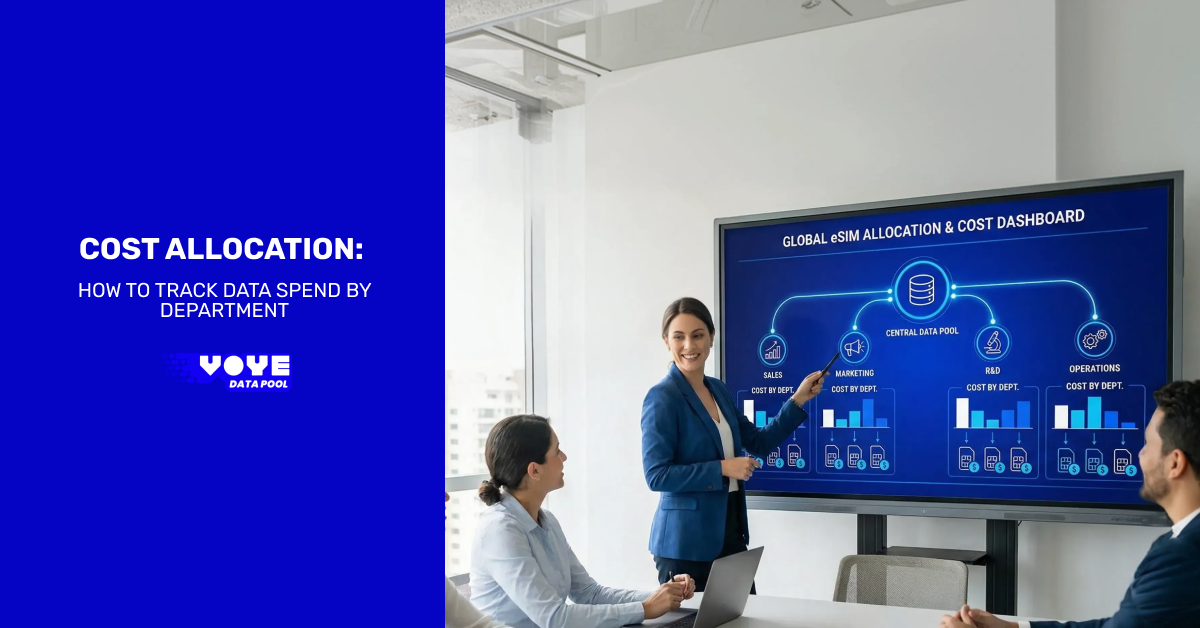
Modern organizations run on mobile connectivity. Field technicians upload photos, sales teams demo products on tablets, executives travel constantly, and support agents rely on messaging and cloud tools. The challenge is not only providing connectivity. The real challenge is understanding who is using the data and why it costs what it costs.
Without cost allocation, mobile connectivity becomes an invisible expense. Finance sees a large telecom bill, but cannot connect it to business activity. IT struggles to justify budgets. Department heads cannot manage usage. That is exactly where structured data cost allocation becomes essential.
This guide explains how to design, implement, and optimize departmental data cost tracking using an enterprise eSIM platform such as Voye Data Pool.
What Is Data Cost Allocation?
Data cost allocation is the process of assigning mobile connectivity expenses to the specific department, team, or function responsible for generating the usage.
Instead of one company wide connectivity bill, you create accountability. Every gigabyte has an owner.
Typical allocation targets:
- Sales teams
- Field operations
- Logistics and delivery
- Customer support
- Executive travel
- Remote employees
- Temporary contractors
Why this matters: mobile data is no longer a minor overhead expense. In many organizations it rivals software licensing costs.
Why Businesses Lose Track of Mobile Data Spend?
Most companies originally purchased mobile plans employee by employee. That model worked when only a few people needed company phones. It fails at scale.
Common causes of uncontrolled data spend:
1. Individual Carrier Contracts
Employees receive individual SIM cards. Bills arrive separately. Finance cannot consolidate usage.
2. International Roaming
Traveling employees generate unpredictable roaming charges. A single trip can exceed a monthly budget.
3. Shared Devices
Warehouses, retail stores, and service teams share tablets or hotspots. No one knows which department owns the usage.
4. Remote and Hybrid Work
Workers outside the office rely heavily on mobile networks when WiFi is unavailable.
5. Lack of Visibility
Traditional carrier invoices summarize charges but rarely show actionable usage patterns.
The result is simple: companies pay for connectivity but cannot connect cost to productivity.
Business Impact of Not Allocating Data Costs
Poor visibility does not only affect accounting. It impacts decision making across the organization.
Finance
- Cannot forecast telecom expenses
- Cannot attribute operational costs accurately
- Budget planning becomes guesswork
IT
- Receives blame for overages
- Cannot optimize plans
- Cannot identify abnormal usage
Department Managers
- Cannot manage employee behavior
- No accountability
- No incentive to reduce waste
Executives
- Lack real ROI insight for mobility initiatives
Cost allocation fixes all four problems simultaneously.
The Modern Solution: Centralized eSIM Management
Enterprise eSIM platforms change how companies deploy connectivity. Instead of physical SIM cards tied to carriers, devices receive digital profiles managed from a central dashboard.
Key capabilities include:
- Central plan purchasing
- Remote activation
- Global coverage
- Usage analytics
- User level reporting
More importantly, they allow structured cost allocation.

Seamless eSIM Connectivity for Enterprises
Activate, manage, and scale eSIMs with ease.
Step 1: Define Allocation Categories
Before tracking data spend, you must define how the organization will categorize usage. This is the most important step and often skipped.
Start with functional departments, not job titles.
Recommended structure:
| Category | Example Users |
|---|---|
| Sales | Account executives, regional reps |
| Field Service | Technicians, maintenance crews |
| Logistics | Drivers, dispatch tablets |
| Support | Call center remote agents |
| Corporate | Executives, leadership |
| Temporary Workforce | Contractors, seasonal staff |
Tip: Avoid over segmentation. Five to eight categories is usually optimal. Too many categories create reporting complexity.
Step 2: Assign Users and Devices
Each device must be linked to a responsible business unit. With a centralized connectivity platform you assign users inside the admin dashboard.
Typical assignment data:
- Employee name
- Department
- Device type
- Location
- Usage purpose
Examples:
- Tablet in a delivery truck → Logistics
- Technician phone → Field service
- Trade show hotspot → Marketing
- Remote laptop modem → Support
Once assigned, all usage automatically flows into the correct cost center.
Step 3: Implement Data Pooling
Traditional mobile plans give each user a fixed allowance. Some employees exceed limits while others barely use data.
Data pooling changes the model. Instead of individual plans, the organization purchases a shared data allowance used by all devices.
Benefits:
- Reduces overage charges
- Balances high and low usage employees
- Simplifies billing
- Enables departmental allocation
This is critical because cost allocation works best when usage is centralized first.
Step 4: Track Usage by Department
Now the key step. Measure actual consumption.
A modern connectivity dashboard provides:
Usage Analytics
- Data consumed per device
- Data consumed per department
- Peak usage times
- Geographic distribution
Example Metrics
- Sales: 320 GB/month
- Field service: 480 GB/month
- Logistics: 220 GB/month
- Support: 90 GB/month
You now have real operational insight instead of a generic telecom invoice.
Step 5: Convert Usage Into Cost
Once usage is known, convert it into a financial allocation model.
Basic Allocation Formula
Department Cost = Department Data Usage ÷ Total Data Usage × Total Monthly Data Expense
Example:
Company monthly connectivity spend: $2,000
Total usage: 1,000 GB
Sales used 300 GB.
Sales department cost:
300 ÷ 1,000 × 2,000 = $600
This creates a fair usage-based chargeback system.
Step 6: Create Department Chargebacks
There are two financial models companies typically use.
Chargeback
Each department pays its actual usage cost from its own budget.
Best for:
- Large enterprises
- Multiple cost centers
- Highly mobile teams
Showback
Finance reports departmental costs but does not bill them.
Best for:
- Growing companies
- Early adoption phase
Showback often evolves into chargeback once managers understand the value.
Step 7: Detect Inefficiencies
Cost allocation is not only accounting. It is an operational intelligence tool.
Once departments see usage, patterns emerge.
Common discoveries:
- Streaming media during work hours
- Background app updates consuming data
- Unused active devices
- International roaming spikes
- Misconfigured IoT devices
These insights often reduce telecom costs by 20 to 40 percent.
Step 8: Optimize Data Plans
After several months of tracking, you can refine purchasing decisions.
Actions you can take:
- Increase pooled allowance for high productivity teams
- Limit usage caps for low priority devices
- Schedule automatic activation only when needed
- Assign regional data profiles to travelers
- Disable inactive eSIMs
Optimization is continuous, not a one time activity.
A Practical Example
A construction company operates in three regions and employs:
- 40 field technicians
- 12 sales reps
- 10 office staff
Before allocation:
- Monthly telecom bill: unpredictable
- Frequent overages
- No accountability
After implementing departmental tracking:
- Field service responsible for 55% of usage
- Sales responsible for 30%
- Corporate staff responsible for 15%
Results:
- Adjusted budgets correctly
- Removed 18 inactive devices
- Reduced roaming costs
- Monthly spend dropped 28%
The biggest change was not cost reduction. It was transparency.
Best Practices for Successful Cost Allocation
- Assign every device to a department immediately upon activation
- Review reports monthly
- Monitor travel related usage weekly
- Deactivate unused devices quickly
- Educate department managers
- Start with showback before chargeback
- Use pooled data instead of per user plans
- Set alerts for abnormal usage
Common Mistakes to Avoid
Tracking only invoices
Invoices are summaries, not analytics.
Overcomplicated categories
Too many departments makes reporting useless.
Ignoring shared devices
Shared tablets often generate the highest data usage.
No manager visibility
If department heads do not see reports, behavior never changes.
How Voye Data Pool Supports Departmental Cost Tracking?
A centralized eSIM platform enables the entire process described above because connectivity, users, and analytics live in one system.
Capabilities include:
- Remote eSIM assignment to devices
- Multi user dashboard management
- Global connectivity across more than 130 countries
- Centralized data pools
- Detailed usage analytics and reporting
- Activation and deactivation controls
Organizations can assign employees, monitor usage, and generate reports without handling physical SIM cards or negotiating multiple carriers.
This allows finance, IT, and operations teams to work from the same dataset.
Final Thoughts
Mobile connectivity has become an operational infrastructure, similar to cloud computing. Yet many companies still manage it like an office utility.
Cost allocation changes that perspective. Instead of an uncontrollable telecom expense, connectivity becomes a measurable business resource tied directly to productivity.
When departments see their own usage and budgets reflect real activity, behavior changes quickly. Waste drops, planning improves, and executives gain clarity on mobility ROI.
The goal is not just to reduce data spend. The goal is to understand how connectivity supports the business.
Once you can measure it, you can manage it.
Start Managing Your Company’s Data Smarter
Stop guessing where your telecom budget goes.